Title here
Summary here
Detectors are regex-based content scanners that run against the body text of Confluence pages during a content scan. When a detector’s pattern matches text in a page, Aegis creates a security finding linked to that page. Detectors help identify sensitive data that has been inadvertently stored in Confluence, credentials, PII, financial account numbers, API keys, and similar content.
All detectors use JavaScript regex syntax. Flags g (global) and i (case-insensitive) are applied automatically to every pattern, you do not need to include them in the pattern itself.
The Detectors tab organizes the 200+ built-in detectors into collapsible groups (accordion) by category. By default, only the Core group is expanded. Each group shows a count badge: “N / M enabled” where N is the count of currently enabled detectors and M is the total in the group.
A search box at the top allows filtering across all groups simultaneously. Searching “aws” will show all AWS-related detectors regardless of which group they are in.
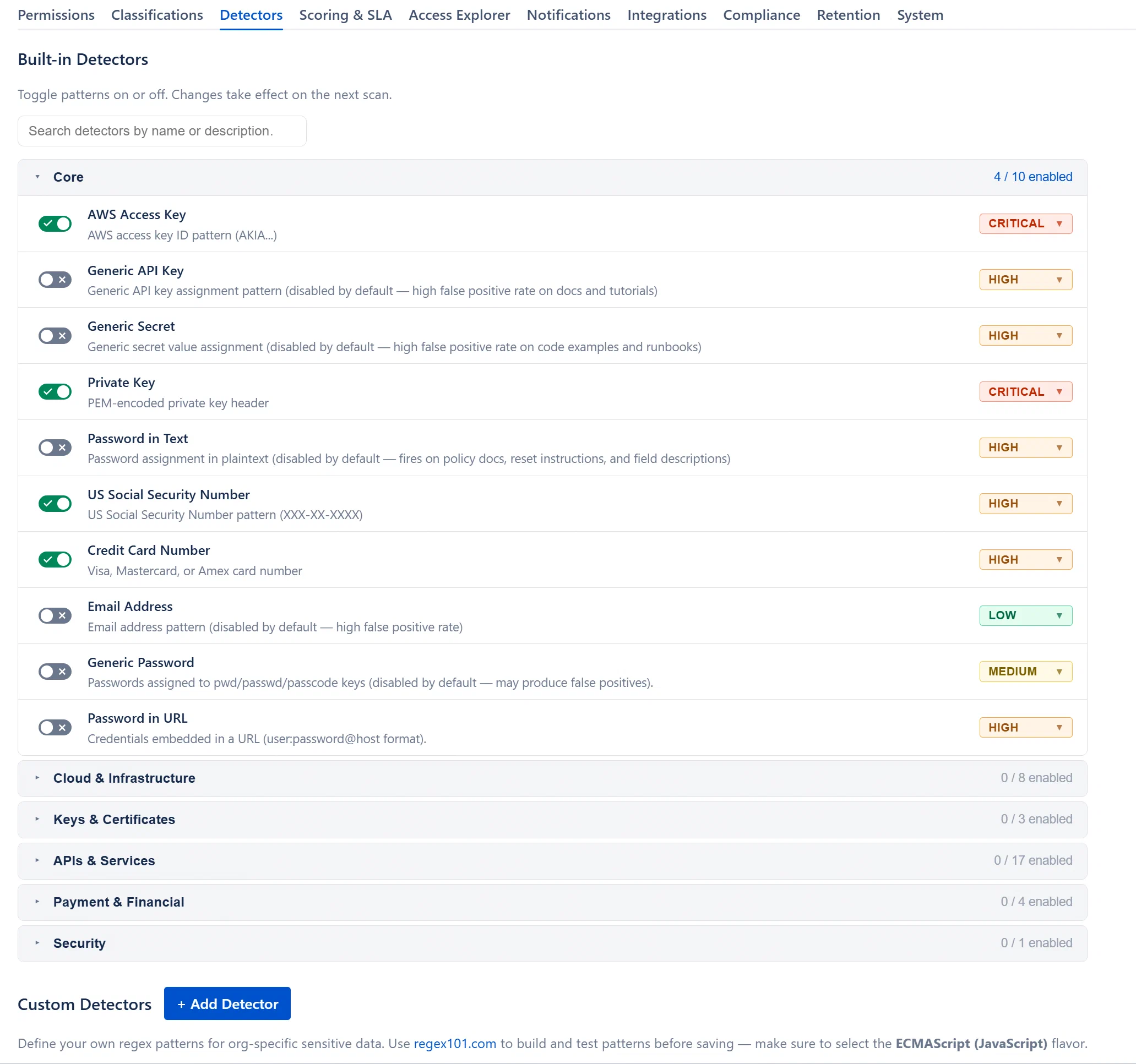
Detectors are organized into groups by category. Cloud Platforms, Source Control & CI/CD, Communication, AI & ML, Monitoring, Payment & Financial, Email & Marketing, Developer Tools, Identity & Access, Content & E-commerce, and other service-specific groups. See Built-in Detector Reference for the complete list of all 200+ detectors.
Four detectors are enabled by default: AWS Access Token, Credit Card, SSN, and Private Key. All others are off by default.
Each detector row has a Toggle switch on the left. Click the toggle to enable or disable the detector. Changes are saved immediately to KVS. The change takes effect on the next scan run, running scans are not interrupted.
You can also change the severity of each finding that the detector creates using the severity pill on the right of each row. Click the pill to open a dropdown (Critical, High, Medium, Low). Changing severity applies to new findings created in future scans; it does not retroactively update existing findings.
Note: More enabled detectors = longer scan time. Each enabled detector runs its regex against every page body. For a large Confluence instance, enabling all 200+ detectors simultaneously will significantly increase scan duration. Enable additional detectors selectively based on your organization’s risk profile.