Title here
Summary here
The Audit Log is an append-only, immutable evidence trail of every significant action performed in Aegis. It records:
Additionally, the Audit Log includes scan job run records (from the job-run entity), showing content scan and permission scan start/completion/failure with duration and statistics.
Note: Audit Log entries are never deleted through the application interface. The only removal path is the automated data retention purge job, which respects the configured retention period (default: 365 days for evidence events).
Each row in the Audit Log represents one evidence event:
| Field | Content |
|---|---|
| Time | Timestamp of the event. Shown as “Today, HH:MM”, “Yesterday, HH:MM”, or “Mon DD, HH:MM” for older events |
| Action | Human-readable event name (e.g., “Finding Created”, “Status Changed”, “SLA Breached”) |
| Entity | Entity type (Finding / Case / Exception / Exposure / Scan / Config) with an inline detail showing state changes where available (e.g., “→ in progress”) |
| Actor | Display name of the Confluence user who performed the action; “System” for automated job actions |
Detail inline text examples:
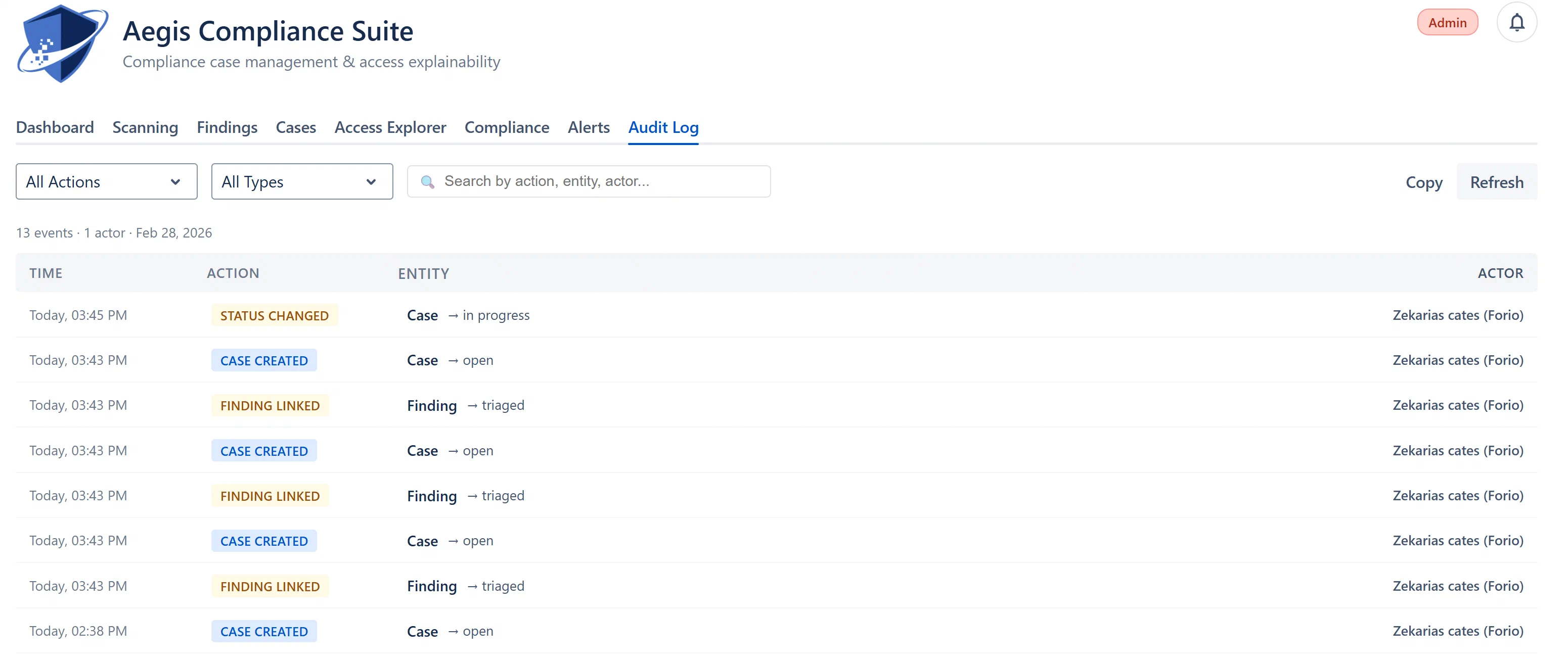
The underlying evidence event record stores both a beforeState and afterState field as JSON. These are not directly displayed in the table view (to keep the log readable), but are available:
afterStateWhat before/after state contains:
finding_status_changed: { status: 'triaged' } (after) and { status: 'open' } (before)case_assigned: { assigneeId: 'accountId123' } (after) and { assigneeId: '__unassigned__' } (before)config_changed: the full settings object before and after the change